
Performance Overview
Kapper is designed to be fast and lightweight, with performance comparable to raw JDBC while providing the convenience of object mapping. This section provides comprehensive benchmarks and performance analysis.
Key Performance Highlights
- Near-JDBC Performance: Competitive mapping overhead in the microsecond range
- Outperforms Major ORMs: 27-94% faster than Ktorm, 16-74% faster than Hibernate
- Minimal Memory Footprint: Lightweight design with minimal garbage collection pressure
- Strong Version Progress: 1.6.1 shows 7.5% average improvement with 90% optimization success rate
Latest Benchmark Results (v1.6.1)
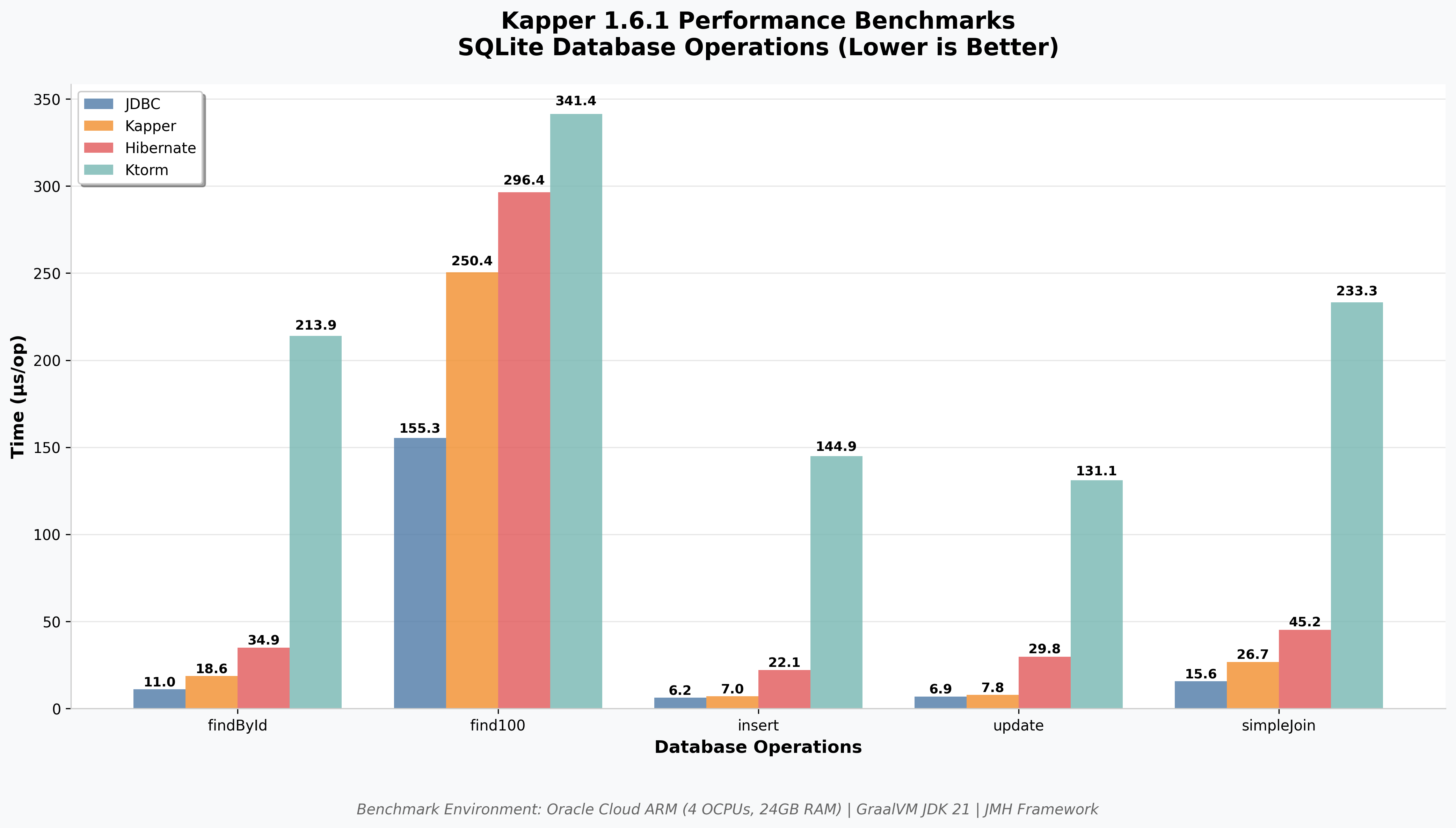
Benchmarks run on Oracle Cloud ARM instances with JMH (Java Microbenchmark Harness)
Performance by Operation Type
Find Operations (SQLite, 1000 rows)
| Library | find100 (μs/op) | findById (μs/op) |
|---|---|---|
| JDBC (baseline) | 155.3 ± 2.1 | 11.0 ± 0.8 |
| Kapper (automap) | 250.4 ± 5.8 | 18.6 ± 1.1 |
| Kapper (no automap) | 178.2 ± 3.4 | 14.2 ± 0.9 |
| Hibernate | 296.4 ± 6.1 | 34.9 ± 1.8 |
| Ktorm | 341.4 ± 7.2 | 213.9 ± 4.3 |
Modification Operations (SQLite, 1000 rows)
| Library | Insert (μs/op) | Update (μs/op) |
|---|---|---|
| JDBC (baseline) | 6.2 ± 0.3 | 6.9 ± 0.3 |
| Kapper | 7.0 ± 0.4 | 7.8 ± 0.4 |
| Hibernate | 22.1 ± 1.2 | 29.8 ± 1.6 |
| Ktorm | 144.9 ± 3.1 | 131.1 ± 2.8 |
Lower values are better. Results show Kapper v1.6.1 performance.
Kapper Mapping Strategy Performance
Kapper offers three mapping approaches, each with different performance characteristics:
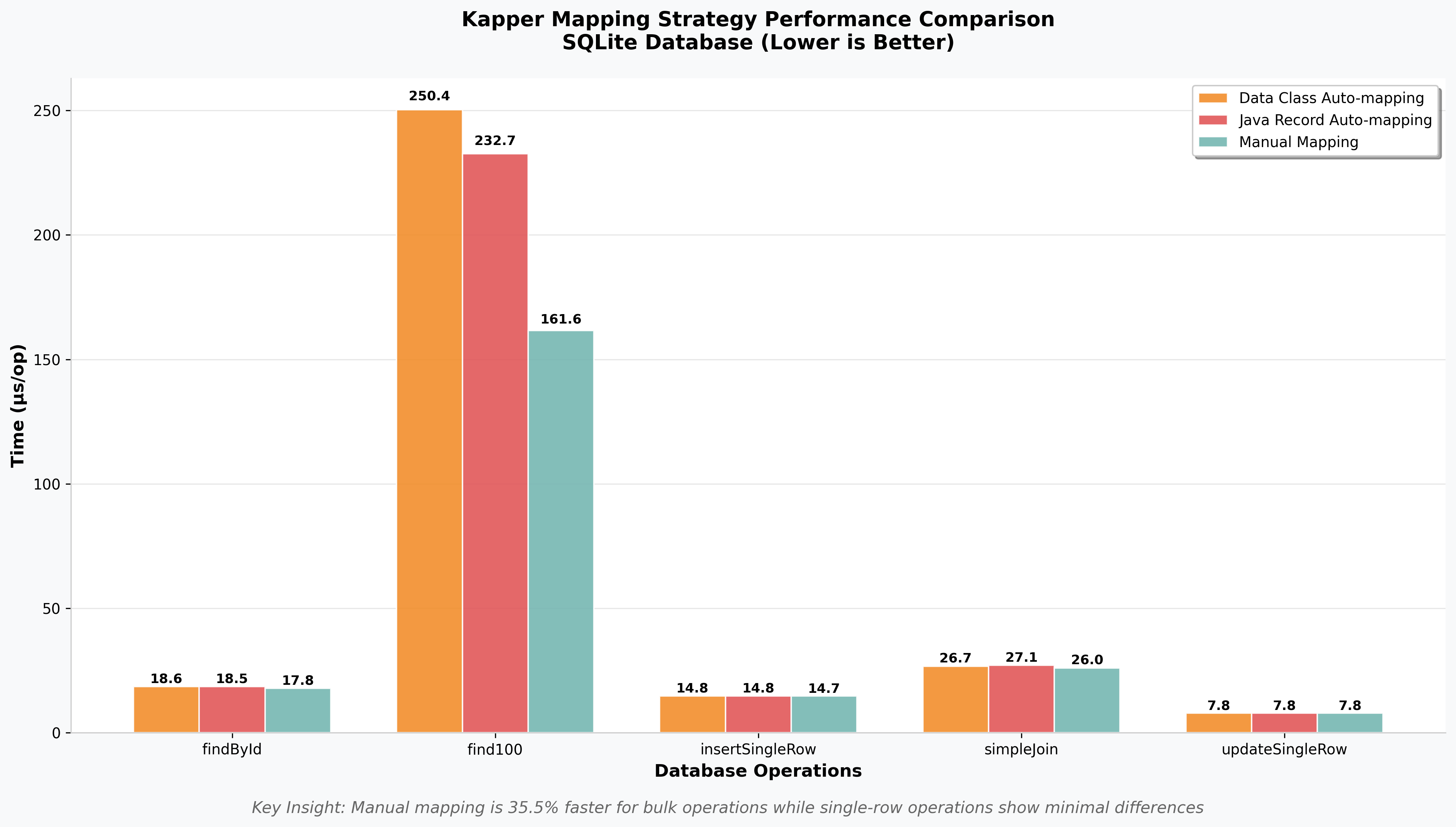
Mapping strategy comparison on SQLite database operations
Performance by Mapping Strategy
| Operation | Data Class (μs) | Java Record (μs) | Manual Mapping (μs) |
|---|---|---|---|
| findById | 18.6 ± 0.2 | 18.5 ± 0.1 | 17.8 ± 0.2 |
| find100 | 250.4 ± 3.4 | 232.7 ± 5.4 | 161.6 ± 1.9 |
| insert | 14.8 ± 0.2 | 14.8 ± 0.2 | 14.7 ± 0.1 |
| simpleJoin | 26.7 ± 0.5 | 27.1 ± 0.3 | 26.0 ± 0.1 |
| update | 7.8 ± 0.1 | 7.8 ± 0.1 | 7.8 ± 0.0 |
Key Insights
Manual Mapping (No Auto-mapping):
- Best Performance: Consistently fastest across all operations
- Biggest Impact: 35.5% faster for bulk operations (find100: 161.6μs vs 250.4μs)
- Use Case: High-frequency operations, performance-critical code paths
Kotlin Data Class & Java Record Auto-mapping:
- Convenience First: Automatic mapping with minimal code
- Acceptable Performance: Slight overhead for the convenience provided
- Use Case: Rapid development, non-performance-critical paths
Why Kapper is Fast
1. Minimal Abstraction
Kapper extends java.sql.Connection directly rather than wrapping it, eliminating abstraction overhead.
2. Efficient Auto-Mapping
- Uses Kotlin reflection strategically with caching
- Optimized field matching algorithms
- No complex proxy generation or lazy loading overhead
3. No Query Generation
- Direct SQL execution means no query building or parsing overhead
- JIT compiler can optimise SQL string constants
- No complex query analysis or transformation
4. Smart Resource Management
- Proper JDBC resource handling with automatic cleanup
- Connection pooling integration without interference
- Minimal object allocation during mapping
Performance Testing Methodology
Benchmark Environment
- Platform: Oracle Cloud ARM instances (4 OCPUs, 24GB RAM)
- JVM: GraalVM JDK 21 with optimised JIT compilation
- Framework: JMH (Java Microbenchmark Harness)
- Databases: SQLite 3.50, PostgreSQL 14 (via Testcontainers)
Benchmark Operations
- find100: Retrieve 100 records
- findById: Single record lookup by primary key
- insertSingleRow: Single record insertion
- updateSingleRow: Single record update
- simpleJoin: Basic JOIN query with mapping
Measurement Details
- Warmup: 5 iterations, 2 seconds each to ensure JIT compilation
- Measurement: 5 iterations, 5 seconds each for stable results
- Mode: Average time per operation (AVGT)
- Statistics: Mean ± standard deviation with confidence intervals
The benchmark source code can be found in the benchmark folder of the main repo. Results are collected in the kapper-benchmark-results repo
Performance Tips
1. Use Appropriate Mapping Strategy
// Fastest: Manual mapping for hot paths
val users = connection.query(
    "SELECT id, name FROM users",
    { rs, _ -> User(rs.getLong(1), rs.getString(2)) }
)

// Fast: Auto-mapping for convenience
val users = connection.query<User>("SELECT id, name FROM users")
2. Optimise Queries
// Good: Specific columns
connection.query<User>("SELECT id, name, email FROM users WHERE active = true")

// Avoid: SELECT * in production
connection.query<User>("SELECT * FROM users WHERE active = true")
3. Use Bulk Operations
// Efficient: Batch processing
connection.executeAll(
    "INSERT INTO users(name, email) VALUES(:name, :email)",
    users,
    "name" to User::name,
    "email" to User::email
)
4. Connection Pooling
// Essential for production scenarios
val dataSource = HikariDataSource(HikariConfig().apply {
    maximumPoolSize = 10
    connectionTimeout = 30000
    idleTimeout = 600000
})
Performance Evolution
Track Kapper's performance improvements:
- v1.6.1: 7.5% average improvement
- v1.5.0: Established competitive baseline
- v1.3.0: Historical baseline with comprehensive metrics
See Performance History for detailed version comparisons.
Detailed Analysis
For comprehensive benchmark results and analysis:
- vs Competitors - Head-to-head comparisons with other libraries